
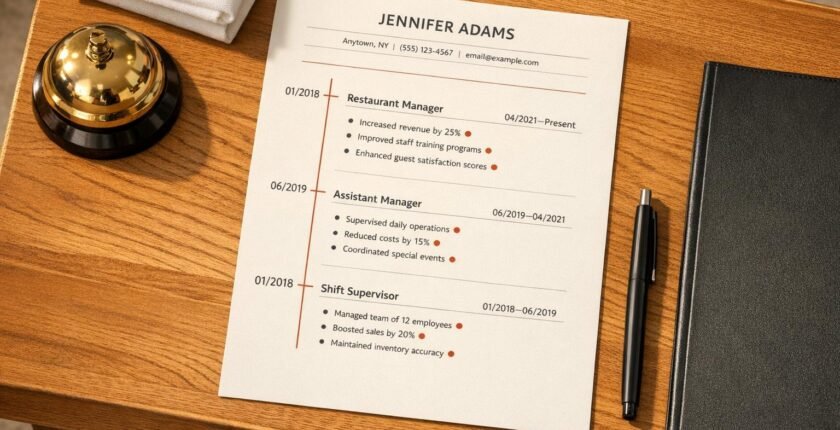
How to Add Promotions on a Resume (Even If Titles Were Messy)
Want to showcase career growth on your resume – even if your job titles are confusing? Here’s how to make your promotions stand out in seconds:
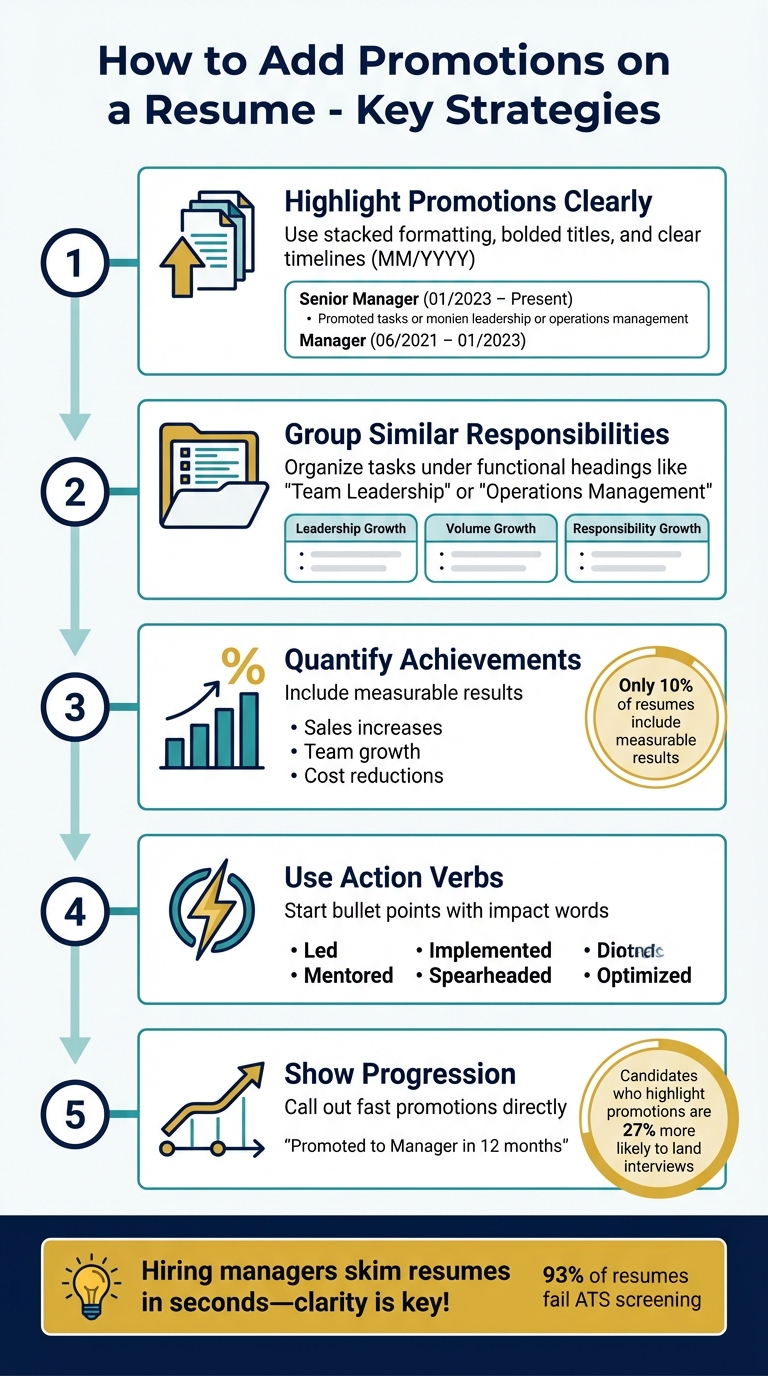
- Highlight promotions clearly: Use stacked formatting, bolded titles, and clear timelines (e.g., MM/YYYY).
- Group similar responsibilities: Organize tasks under functional headings like "Team Leadership" or "Operations Management."
- Quantify achievements: Include measurable results like sales increases, team growth, or cost reductions.
- Use action verbs: Start bullet points with words like "led", "implemented", or "mentored" to show impact.
- Show progression: Call out fast promotions or additional responsibilities directly (e.g., "Promoted to Manager in 12 months").
Pro tip: Hiring managers skim resumes in seconds, so clarity is key. Use these strategies to turn messy job titles into a clear story of growth and accomplishments.
5 Steps to Showcase Promotions on Your Resume
How to Show Promotions on Your Resume (With Examples)
sbb-itb-306cd44
Common Challenges in Restaurant Career Progression
For restaurant professionals, showcasing career growth comes with its own set of hurdles. Unlike the corporate world, where roles and hierarchies are more structured, the hospitality industry often operates with fluid job titles and overlapping responsibilities. This lack of standardization can make it harder to demonstrate upward mobility. Let’s explore why these inconsistencies happen and how they can affect career progression.
Why Restaurant Job Titles Are Often Inconsistent
Job titles in the restaurant industry can vary widely, even when the responsibilities are nearly identical. For instance, one establishment might call a role "Assistant General Manager", while another uses "Assistant Manager" for the same duties. Without highlighting how your responsibilities have evolved, your career might appear static to potential employers.
Context adds another layer of complexity. Take the title "Area Manager" – in one company, it could mean overseeing multiple locations across a region; in another, it might refer to managing different sections within a single large venue, like an airport terminal. Without proper explanation, hiring managers might misunderstand your role.
Here’s another example: transitioning from "Executive Sous Chef" at a small café to "Sous Chef" at a high-volume restaurant. While it might look like a step down on paper, the new role could involve supervising a larger team and handling significantly higher sales volume. Marcel Kuenzler from Goodwin Recruiting points out that these nuances often go unnoticed during the quick resume scans hiring managers typically perform.
Sometimes, title changes don’t signify a promotion but instead reflect a more accurate description of existing duties. However, these adjustments can clutter your resume with stacked entries, confusing both recruiters and Applicant Tracking Systems (ATS). This can make your career timeline seem inconsistent or misleading.
Why Career Growth Matters to Hiring Managers
Even with title inconsistencies, showing clear career progression is crucial. It signals that previous employers trusted you enough to expand your responsibilities – a key indicator of your value. In fact, in an industry where 93% of resumes fail ATS screening, effectively communicating your growth can set you apart.
"A promotion proves that you’re a valuable team member whose work is noticed and appreciated by your employer".
This kind of validation is important because hiring managers are looking for candidates who can deliver long-term value. In the restaurant industry, where loyal customers spend up to 73% more on repeat visits, employers want team members who have demonstrated reliability and the ability to grow within an organization. Clear career growth on your resume can provide that assurance.
Group Similar Responsibilities Under Clear Headings
Organizing your responsibilities under clear, functional headings can highlight your career growth and clarify your professional journey. This approach is especially helpful when job titles alone don’t fully capture your progression. Instead of listing duties under inconsistent titles, group similar tasks into categories that hiring managers will immediately recognize.
For example, in restaurant management, there are a few key areas that demonstrate career progression. Leadership growth might show an increase in team size – perhaps you went from managing a small group of 5 servers to overseeing a team of 25 staff members. Volume growth could reflect a move from managing a $1.5M location to handling a $10M operation. And responsibility growth might involve taking on new areas like P&L management, inventory control, or staff training. These categories make your career trajectory clear, even if your titles were less descriptive.
To make this structure work, use subheadings like "Staff Training & Development", "P&L Management & Cost Reduction", or "Operations & Process Improvement" to group your accomplishments. For instance, Victoria Baker at Hilton Hotels & Resorts used "Inventory Management Systems" as a heading to highlight her achievement of reducing food waste by 18% and saving $50,000 annually starting in June 2020. This method is far more effective than scattering similar achievements across multiple job titles.
"That hidden career progression may, at times, even appear as career regression… only if the reader has the time or even chooses to dig in. Ensure that the contents of your resume pop out at first sight!"
- Marcel Kuenzler, Career Advice Expert
Additionally, be clear about the scope of your responsibilities, such as distinguishing between managing multiple independent restaurant locations versus overseeing several dining concepts within a single hotel or airport terminal. This clarity helps hiring managers quickly understand your level of authority and experience.
Use Action Verbs to Describe Your Work
Every responsibility on your resume should start with a strong action verb that conveys initiative and results. Words like "spearheaded", "streamlined", "implemented", and "mentored" show that you actively drove outcomes rather than simply performing tasks. These verbs work seamlessly across all your grouped headings, emphasizing your leadership and impact.
Avoid passive phrases like "responsible for", which can weaken your descriptions. Instead, quantify your achievements. Zachary Fagenson from Restaurant365 advises:
"Avoid passive voice and passive phrases like ‘responsible for.’ Be sure to tie standard responsibilities to their benefits to guests or the company."
- Zachary Fagenson, Restaurant365
For instance, rather than saying "responsible for training staff", you could write, "Mentored 20+ team members, improving staff retention by 30%". The latter is specific, measurable, and demonstrates your contribution effectively.
To keep your resume engaging, vary your action verbs. If you use "managed" in one section, switch it up with alternatives like "orchestrated", "directed", or "coordinated" elsewhere. This variety prevents your resume from feeling repetitive, even when describing similar responsibilities across different roles.
Write Clear Job Descriptions for Each Role
Building on strong action verbs, your job descriptions should clearly articulate the impact of each role. Use the "Skill-Action-Result" formula to frame your accomplishments. This method ties your abilities directly to business outcomes. For example, Sebastian Martin at The Cheesecake Factory in San Diego wrote under "Operations Management": "Revamped staff scheduling system (skill), optimizing shift coverage (action), resulting in 20% boost in labor efficiency and 15% increase in table turnover rates (result)" starting in May 2021.
Whenever possible, quantify your achievements with numbers, percentages, and timeframes. For instance, Henry Jackson at Marriott International increased revenues by 15% through strategic menu planning and reduced costs by 10% with new SOPs between January 2020 and July 2024. These measurable results make your upward mobility and contributions undeniable to hiring managers.
Finally, align your headings and job descriptions with the keywords used in your target job posting. If a role emphasizes "guest experience management", use that exact phrase as a heading rather than a generic term like "customer service." This not only helps your resume pass Applicant Tracking Systems but also shows hiring managers that you understand the specific needs of the role.
Use Timelines to Show Career Advancement
A well-structured timeline instantly highlights your career growth, a critical element when recruiters spend less than 8 seconds scanning resumes. Properly formatting dates and titles can make your upward trajectory unmistakable.
Why Chronological Format Works Best
The reverse-chronological format – starting with your most recent role – is the preferred method for showcasing promotions. This layout places your highest-level position at the forefront, emphasizing your expertise and authority. By grouping all roles under one company heading with stacked titles, you create a cohesive "Grouped Growth Story" instead of a disjointed list of unrelated jobs.
This format also underscores continuity and loyalty. Employees who advance internally are 40% more likely to stay with their company for at least three years. Matthew Bidwell, a Management Professor at the Wharton School, highlights the advantages of internal promotions:
"External hires are paid approximately 18-20% more than internal promotes, yet they receive lower performance evaluations for their first two years on the job."
Internal promotions demonstrate you’re a proven, low-risk hire – someone whose abilities have already been validated by those who know your work.
If you’ve advanced quickly, make sure to spotlight it. Include a note like, "Promoted to General Manager within 14 months – fastest in the district," to signal your high potential. Research shows that candidates who explicitly highlight their promotions are 27% more likely to land interview invitations.
Next, let’s break down how to format your dates and titles clearly.
How to Format Dates and Titles
Consistency is key. Use a simple MM/YYYY format (e.g., 03/2021–06/2023) for all roles. This ensures clarity for both human recruiters and Applicant Tracking Systems (ATS), which are used by 99% of Fortune 500 companies. Avoid using complex tables, graphics, or columns, as these can confuse automated systems.
Here’s the ideal structure:
- Start with the company name and your total tenure, bolded at the top.
- List job titles underneath in reverse-chronological order.
- Bold your most recent or highest-level title to immediately catch the recruiter’s attention.
- Use visual cues such as arrows (→) or bold "Promoted" labels to make career jumps stand out.
For example, if you progressed from Server to Shift Supervisor to Assistant Manager at the same restaurant, format it like this:
The Olive Garden, Orlando, FL | 01/2020–Present
Assistant Manager | 05/2023–Present
→ Promoted to Shift Supervisor | 08/2021–04/2023
Server | 01/2020–07/2021
Include specific date ranges for each role to highlight the speed of your promotions. If your responsibilities were similar across roles, consolidate bullet points under all titles. If your duties changed significantly with each promotion, provide separate bullet points for each position.
This clear and concise approach reinforces your career progression, a key theme throughout this guide. Use the table below as a quick reference for formatting:
| Timeline Element | Recommended Formatting |
|---|---|
| Dates | MM/YYYY (e.g., 01/2022–05/2024) |
| Promotion Indicator | Arrows (→) or bold labels like Promoted |
| Company Name | Bolded at the top of the entry |
| Job Titles | Bolded and listed newest to oldest |
Use Achievements to Demonstrate Growth
When it comes to showing career progression, measurable achievements are your best friend. They do more than just highlight promotions – they prove why you earned them. Surprisingly, only 10% of resumes include measurable results. That means adding quantifiable accomplishments can instantly make you stand out. Rory Miller, CPRW at Enhancv, puts it this way:
"Promotions are more than just job title changes – they’re milestones that prove your growth, adaptability, and ability to deliver results."
If you’re a restaurant manager, focus on three main areas to identify achievements: Volume (like boosting sales or guest counts), Leadership (such as managing bigger teams), and Responsibility (think inventory control, scheduling, or bar program management). For example, moving from overseeing a $1.5M operation to managing a $10M flagship location shows growth in volume, even if your title didn’t change. Similarly, increasing your leadership scope from supervising 10 front-of-house staff to managing 40+ employees demonstrates significant responsibility and leadership development.
Choose Achievements You Can Measure
Numbers speak louder than vague claims. Instead of writing "improved customer satisfaction", back it up with data: "increased guest satisfaction scores from 82% to 94% in six months". For financial achievements, include exact figures or percentages, like "reduced food waste by 18%, saving $24,000 annually" or "drove upselling efforts that increased average check size by $8.50".
A strong structure for bullet points is: [Action Verb] + [Task] + [Result].
For example:
- "Implemented cross-training program that reduced labor costs by 12% while maintaining service quality standards."
Track metrics that matter in your industry, such as table turnover rates, employee retention, Net Promoter Scores, or the number of staff you trained and promoted. Concrete examples like "Managed transition from a $1.5M unit to a $10M flagship location" make your growth impossible to ignore.
Connect Achievements to Promotions
Take it a step further by directly linking your accomplishments to your promotions. The "Promoted Due To" approach works well here. Start your new role’s description by explaining the achievement that earned you the promotion:
- "Promoted to General Manager after reducing annual operating costs by 15% through vendor renegotiations".
If you advanced faster than the company’s typical timeline, call it out:
- "Advanced to Assistant Manager in 12 months – half the typical timeline – after exceeding quarterly sales targets by 23%".
Even if your title didn’t change, taking on more responsibilities shows growth. For example:
- "Increased budget oversight from $10,000 to $50,000 monthly" or "Added responsibility for inventory management across three revenue centers".
Format Your Work History for Clarity
Your work history should clearly narrate your career progression. Recruiters often skim resumes, so a well-structured format can make your professional growth stand out without requiring extra effort to decipher.
Structure Content with Subheadings and Bullet Points
The stacked format is a great way to showcase promotions within the same company. Start by listing the company name and total tenure (e.g., "The Olive Garden, 2018–Present"), followed by your job titles in reverse-chronological order. This layout highlights loyalty and progression at a glance.
Here’s how to format it: Bold your job titles and include dates in parentheses next to each one. For example:
- General Manager (June 2023–Present)
- Assistant Manager (January 2021–June 2023)
- Shift Lead (March 2018–January 2021)
To emphasize promotions, you can use symbols like arrows or bold formatting to connect roles.
When listing responsibilities, focus on achievements instead of daily tasks. Use 3–5 bullet points for your current or most senior role, and fewer for older positions. Start each bullet with strong action verbs like "Spearheaded", "Optimized", or "Transformed", and include measurable results whenever possible. For example:
- Spearheaded a customer loyalty program, increasing repeat visits by 25% within six months.
- Optimized staff scheduling, reducing overtime costs by 15%.
Stick with standard headers and bullet points to ensure your resume is both visually appealing and ATS (Applicant Tracking System) friendly.
Combine Overlapping Roles into Single Entries
For roles with overlapping responsibilities, consolidate them into one entry to avoid redundancy. For instance, if you worked as both a Server and Shift Lead at the same time, combine them: Server / Shift Lead (March 2019–August 2021). Focus on the highest-level responsibilities and accomplishments during that period.
If your roles were significantly different – like moving from kitchen duties to front-of-house management – list the company name once and create separate sub-sections for each title with distinct bullet points. This approach works well for departmental transitions where your responsibilities changed meaningfully.
For unrelated concurrent roles (e.g., a part-time side job alongside a full-time position), list them separately. Be clear with month-year dates and include descriptors like "Part-Time" or "Contract" to avoid confusion. This transparency highlights your ability to handle multiple commitments effectively.
| Factor | Stacked Format (Combined) | Separate Entries |
|---|---|---|
| Visual Impression | Highlights career growth and loyalty | Can look like job-hopping if not carefully done |
| Space Efficiency | Compact; leaves room for key accomplishments | Takes up more space |
| Best Use Case | Sequential promotions with similar roles | Lateral moves or department transitions |
| ATS Parsing | Shows total experience clearly | Highlights distinct, unrelated skill sets |
For older roles (10–15 years ago), condense multiple promotions into a single line to save space. Recruiters are most interested in your recent experience, so prioritize clarity and impact for roles from the past 5–7 years.
Conclusion
Highlighting promotions on your resume doesn’t have to feel overwhelming, even if your job titles don’t line up perfectly or your roles overlapped. By using techniques like stacked formatting, clear timelines, measurable achievements, and organized headings, you can effectively showcase your career growth in a way that resonates with both hiring managers and Applicant Tracking Systems.
Keep in mind that internal promotions are a major plus for hiring managers, as they show you’re a high performer who delivers results. Structuring your resume in reverse-chronological order, tying specific accomplishments to each role, and backing up your impact with numbers can turn a cluttered work history into a clear and impressive story of professional growth.
In industries like food service, where loyalty and proven skills matter, showing a track record of advancement – whether it’s moving from Shift Lead to Assistant Manager to General Manager – can set you apart. When you pair these promotions with concrete metrics, like revenue increases or cost savings, you demonstrate exactly what employers value most: reliability, trustworthiness, and a history of exceeding expectations.
Take a moment to review your current resume. Apply the strategies outlined here, focusing on the last 5–7 years of your experience. Use strong action verbs, emphasize increased responsibilities, and connect your promotions to measurable successes. These adjustments will not only make your resume stand out but also highlight the career progression you’ve worked so hard to achieve.
FAQs
Should I change my job title on my resume if it was unofficial or inconsistent?
If your job title was unofficial or inconsistent, it’s a good idea to adjust it on your resume. Make sure the title reflects your actual responsibilities and career progression, but stay honest. This approach helps potential employers clearly understand your role and the impact you made.
How do I show a promotion when my duties barely changed?
When presenting a promotion where your responsibilities were largely the same, you can group roles under one company header. However, if your duties evolved, it’s better to list them as separate roles. In either case, emphasize results and measurable accomplishments for each position to clearly illustrate your growth and progress within the company.
What numbers should I use if I don’t have exact sales or cost data?
If precise sales or cost data isn’t accessible, use estimates or approximate figures to give a general idea of performance. Just make sure the numbers are realistic and align with the scope of your role to ensure they remain credible.