
How to Make Your Resume ATS-Friendly Without Making It Boring
When applying for jobs, most resumes don’t even make it to a human recruiter. Why? Applicant Tracking Systems (ATS). These systems scan resumes for specific keywords and formatting, and if they don’t find what they’re looking for, your application could be rejected – even if you’re qualified.
Here’s what you need to know to create an ATS-friendly resume that still impresses hiring managers:
- Use simple formatting: Stick to single-column layouts, standard fonts (like Arial or Calibri), and avoid tables or graphics.
- Include keywords from the job description: Match terms like “P&L management” or “inventory control” exactly as they appear.
- Quantify your achievements: Use numbers to show your impact, like “Cut food waste by 15% in 3 months.”
- Choose the right file format: Save your resume as a .docx file unless otherwise specified.
- Test for ATS compatibility: Paste your resume into a plain-text editor to ensure it’s readable.
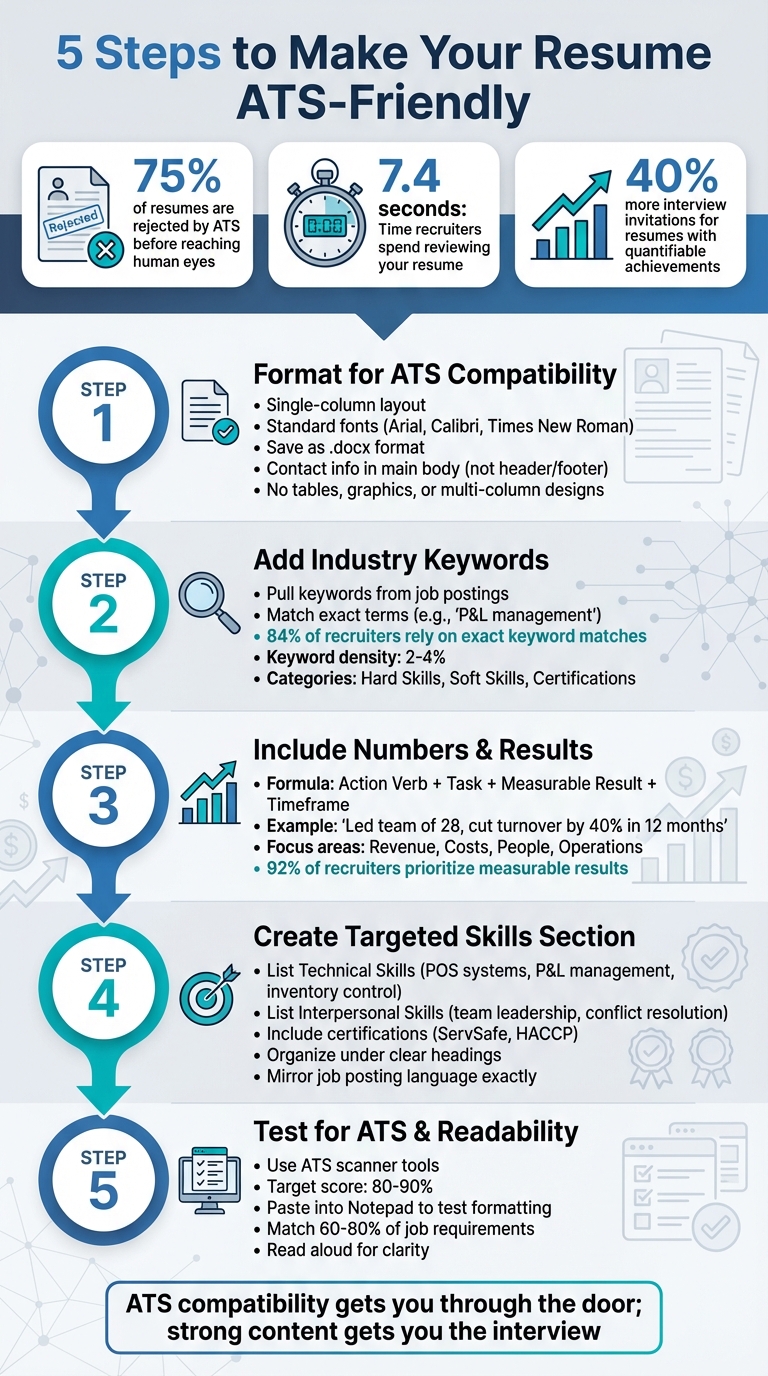
5 Steps to Create an ATS-Friendly Resume for Restaurant Managers
Step 1: Format Your Resume for ATS Compatibility
Use Simple Layouts and Standard Fonts
Stick to a single-column layout to ensure your resume is easy to read and properly parsed by Applicant Tracking Systems (ATS). Avoid using multi-column designs, sidebars, or tables, as these can confuse ATS software and cause essential details – like your experience in cost control or team leadership – to be overlooked.
Choose clean, web-safe fonts such as Arial, Calibri, Times New Roman, Georgia, or Helvetica. Decorative fonts, symbols, or graphics can make your resume unreadable to ATS software, which may either scramble the text or skip it entirely. Since most Fortune 500 companies rely on ATS, keeping your formatting simple is crucial for visibility.
"If they can’t read it, it doesn’t exist."
Place your contact information (name, phone number, email, LinkedIn profile) directly in the main body of the document. ATS software often ignores information in headers or footers. Use standard bullet points, stick to margins between 0.5" and 1", and keep line spacing between 1.0 and 1.15 to maintain a polished and readable appearance.
Choose the Right File Format and Section Headers
Save your resume as a .docx file unless another format is explicitly requested. While many modern ATS platforms can handle text-based PDFs, older systems may struggle with layered or complex PDF formatting. To test compatibility, paste your resume into a plain-text editor like Notepad; if the text looks messy or incomplete, the ATS might have trouble processing it.
Stick to standard section headers like "Work Experience", "Education", "Skills", and "Certifications." Creative headings like "My Journey" or "Career Path" might confuse ATS algorithms. Also, name your file professionally, such as "FirstName_LastName_Resume.docx", to make it easy to find and identify.
Here’s a quick look at how major ATS platforms handle formatting:
| ATS Platform | Market Share | Key Parsing Requirement |
|---|---|---|
| Workday | 42% | Standard headers, .docx format |
| Taleo | 28% | Keyword density of 2-3% |
| Greenhouse | 18% | Skills-focused parsing |
| iCIMS | 12% | Date consistency and standard formats |
Once your resume is formatted to meet ATS requirements, you’re ready to focus on tailoring its content to showcase your restaurant management skills and experience.
sbb-itb-306cd44
Step 2: Add Restaurant Management Keywords
Pull Keywords from Job Postings
Start by copying a restaurant manager job description into a plain-text editor. This removes formatting and helps you focus on the employer’s specific language. Pay attention to words or phrases that appear three or more times – these are often key priorities for the role. Also, note any terms that are emphasized, such as those in bold, ALL CAPS, or bullet points.
Organize these keywords into three categories: Hard Skills (e.g., P&L management, POS systems), Soft Skills (e.g., conflict resolution, team leadership), and Certifications (e.g., ServSafe, HACCP). Enhance your resume by pairing these keywords with action verbs like "developed", "led", or "implemented" to highlight accomplishments. The "Requirements" and "Qualifications" sections of job postings are particularly useful for identifying these terms, as 84% of recruiters rely on exact keyword matches during their search.
Here’s a quick guide to common restaurant management keywords, broken down by category:
| Keyword Category | Essential Terms |
|---|---|
| Operations | P&L Management, Inventory Control, Supply Chain Oversight, Vendor Relations, Labor Cost Reduction |
| Staffing | Team Leadership, Staff Training, Scheduling, Conflict Resolution, Employee Retention |
| Technical | POS Systems (Toast, Square, Micros), OpenTable, Resy, HotSchedules, Payroll Systems |
| Compliance | Food Safety, HACCP, OSHA, Health & Safety Compliance, ServSafe Manager Certification |
Use these keywords to build accomplishment-focused bullet points on your resume.
Combine Keywords with Action Verbs and Numbers
Once you’ve identified the right keywords, integrate them into your resume by writing specific, measurable achievements. A simple formula to follow is: Action Verb + Keyword + Measurable Result. For example, instead of saying "Responsible for inventory", write: "Implemented inventory control protocols that reduced spoilage by 18%". This approach not only satisfies Applicant Tracking Systems (ATS) but also grabs the attention of human recruiters with clear, results-driven statements.
Be precise with your language. If the job posting says "P&L management", use that exact term instead of "profit and loss oversight", as ATS software often looks for exact matches. Include both full terms and their acronyms (e.g., "Point of Sale (POS)") to ensure recognition, regardless of how the keyword is presented. Maintain a keyword density of 2–4% to avoid being flagged as spam by ATS algorithms.
"Most restaurant manager resumes fail because they read like job descriptions instead of achievement stories." – The Interview Guys
Distribute these keywords thoughtfully across your resume. Highlight your top 2–3 skills in the Professional Summary, list additional key terms in a dedicated Skills section, and use them contextually in Work Experience bullet points. For example: "Led staff training programs that increased employee retention by 40% and cut onboarding time from 3 weeks to just 10 days." This method naturally incorporates multiple keywords while showcasing the value you’ve delivered in previous roles.
How to Create an ATS-Friendly Resume (and get through the scanners)
Step 3: Include Numbers and Results
Now that you’ve refined the formatting and added essential restaurant management terms, it’s time to highlight your impact with measurable results.
Use Specific Metrics to Show Impact
Numbers make a difference. Resumes that include quantifiable achievements get 40% more interview invitations, and 92% of recruiters prioritize candidates who showcase measurable results. A simple formula to follow is: Action Verb + Specific Task + Measurable Result + Timeframe.
For restaurant management roles, focus on metrics that matter: revenue growth, cost savings, customer satisfaction, and team performance. For instance, instead of stating, "Managed restaurant staff and reduced turnover", try: "Led a team of 28 staff members, cutting turnover by 40% through a new training and recognition program within 12 months". The revised version not only lists responsibilities but also demonstrates tangible results.
When presenting numbers, always provide context. A percentage carries more weight when paired with a baseline or timeframe. For example, "Reduced food waste from 15% to 8% within the first quarter" is far more compelling than "Reduced food waste by 7%". If confidentiality is a concern, use ranges (e.g., "$200K–$250K") or percentages to show impact without disclosing sensitive details.
For readability, round large numbers – use $1.2M instead of $1,234,567.89 – to make them easy to digest. Highlight key figures like 22% increase to grab attention while ensuring compatibility with ATS systems.
| Metric Category | Restaurant-Specific Examples |
|---|---|
| Revenue | Average check size, annual revenue growth, upselling percentage, covers per shift |
| Costs | Food waste reduction %, labor cost %, vendor contract savings, liquor pour cost % |
| People | Staff turnover reduction %, training completion rates, employee retention rates |
| Operations | Table turnover rate, customer satisfaction scores (NPS), health inspection scores |
Write in Different Ways to Keep It Readable
Start each bullet point with varied action verbs like "Orchestrated", "Surpassed", or "Streamlined" to keep your resume engaging and dynamic.
Keep each bullet point focused on one key metric for clarity. For example, instead of cramming multiple achievements into one line – like "Oversaw operations for a high-volume restaurant, increasing revenue by 20% while reducing costs by 12%" – split it into two distinct accomplishments.
Make sure your metrics cover a range of areas: financial (e.g., P&L, labor costs), operational (e.g., table turnover rates), team development (e.g., retention), and customer satisfaction (e.g., NPS). This balanced mix appeals to both ATS algorithms and hiring managers.
With your achievements quantified and phrased effectively, the next step is tailoring your skills to align with specific job requirements.
Step 4: Create a Targeted Skills Section
Craft a skills section that grabs the attention of hiring managers and clears the hurdles of Applicant Tracking Systems (ATS). With nearly all Fortune 500 companies using ATS to screen resumes – and 75% of qualified candidates being filtered out before a human ever sees them – your skills section needs to meet both digital and human expectations. This part of your resume should highlight the technical and interpersonal skills crucial for restaurant management.
List Technical and Interpersonal Skills
Restaurant management is a balancing act between operational know-how and strong leadership. Your skills section should reflect both. Include technical abilities like P&L management, inventory control, and POS system proficiency (e.g., Toast, Square, Micros, or Aloha). Pair these with interpersonal strengths such as conflict resolution and team leadership. You can also highlight familiarity with scheduling tools like 7shifts or HotSchedules and inventory software such as MarketMan or Restaurant365.
To make your skills easy to locate for both ATS software and recruiters, organize them under clear headings like "Operations Management", "Technical Proficiency", "Leadership", and "Compliance." Always spell out acronyms the first time you use them – like Point of Sale (POS) – to ensure clarity. Additionally, certifications like ServSafe Manager, TIPS Alcohol Certification, or CPR/First Aid can help your resume stand out. Wherever possible, reinforce these skills with measurable results in your work experience.
| Skill Category | Technical (Hard) Skills | Interpersonal (Soft) Skills |
|---|---|---|
| Operations | Inventory Control, Staff Scheduling, Vendor Relations | Team Leadership, Conflict Resolution, Multitasking |
| Financial | P&L Management, Budgeting, Labor Cost Control | Upselling, Revenue Growth Strategy, Negotiation |
| Compliance | Food Safety (ServSafe), OSHA/HACCP, Liquor Laws | Staff Training, Coaching, Performance Management |
| Technology | POS Systems (Toast, Square), OpenTable, 7shifts | Bilingual Communication, Customer Relations |
Match Your Skills to Each Job Posting
Once you’ve outlined your core skills, customize them for each job application. Pay close attention to the language used in the job description. For instance, if a listing specifies "inventory management", use that exact term instead of alternatives like "stock control" or "supply oversight." ATS algorithms rely on literal keyword matches, so mirroring the phrasing in the job posting is essential.
"Mirror the phrasing in the job description to describe the skills and experience you possess naturally." – Coursera Staff
Focus on technical skills first, as these are more likely to catch ATS filters. Don’t just list a skill like "Inventory Management" – back it up with results. For example, you could write: "Reduced food waste by 20% through real-time inventory tracking." Label this section as "Skills" or "Core Competencies" to make it ATS-friendly.
If you’re a junior manager, emphasize foundational tools like basic POS systems and scheduling software. On the other hand, senior managers should highlight advanced capabilities, such as multi-unit management, vendor negotiations, and strategic financial planning. By tailoring your skills to each job posting, you not only pass ATS checks but also demonstrate a proven track record to hiring managers.
Step 5: Check Your Resume for ATS and Readability
You’ve polished your resume with formatting, keywords, and measurable achievements. Now, it’s time for a final check to ensure it’s not only readable but also ATS-friendly. Considering that about 75% of resumes are rejected by ATS software before reaching human eyes, this step is critical to your success.
Test Your Resume with ATS Tools
To make sure your resume works for both algorithms and hiring managers, run it through an ATS scanner before submitting. Tools like Resumly‘s ATS Resume Checker or OwlApply‘s ATS Resume Scanner can give you a compatibility score (out of 100) and flag issues like missing keywords or formatting problems. Aim for a score of 80% to 90% for the best results.
A quick and simple test is to paste your resume into Notepad. If the text stays in logical order and all the information appears intact, the ATS will likely read it correctly. If the sections appear scrambled, it’s a sign you need to tweak your formatting. This test reveals exactly how the ATS will interpret your resume – stripped of all visual design, leaving only raw text.
Also, make sure your resume aligns with 60% to 80% of the job posting’s core requirements. For instance, if the job description mentions "inventory management", use those exact words instead of alternatives like "stock oversight."
Read Your Resume Out Loud
Once you’ve confirmed technical compatibility, focus on the human aspect by reading your resume aloud. This step helps you identify awkward phrasing and ensures your career story flows naturally. Pay attention to how your career progression comes across – does it clearly highlight your growth in areas like P&L management, team leadership, or multi-unit operations?
"ATS compatibility gets you through the door; strong content gets you the interview." – FlavoredResume
Listen carefully for repetitive language or vague statements. If a bullet point feels clunky or unclear to you, it will likely confuse a hiring manager too. Your resume must work on two levels: it needs to satisfy the ATS to get noticed and provide clear, engaging content to win over the hiring manager. The first step gets you in the door; the second secures the interview.
Conclusion
Create an ATS-friendly and engaging resume by following these five essential tips: stick to a simple, single-column layout with standard fonts and clear section headers; include keywords relevant to your industry pulled straight from job postings; quantify your accomplishments with specific metrics, like boosting revenue or cutting costs; highlight both technical and interpersonal skills in a dedicated section; and test your resume for ATS compatibility and readability.
When you align your resume’s design with its content, it appeals to both ATS algorithms and hiring managers. Keep in mind that most resumes never make it to a recruiter, and if yours does, you only have 7.4 seconds to grab their attention. Your resume needs to balance ATS optimization with a compelling narrative to increase your chances of landing an interview.
This approach is especially important in competitive fields like restaurant management, where job growth is projected at just 1% through 2029. To stand out, use measurable achievements – such as reducing staff turnover by 40%, cutting food costs by 20%, or increasing weekend sales by $20,000 – to demonstrate your impact.
Once your resume is polished, consider using RR Guy, a free platform tailored to restaurant management roles. With features like job alerts, advanced search tools, and a candidate dashboard, it can help you secure the leadership position you’re aiming for. An ATS-optimized, results-driven resume is your key to landing the role you deserve.
FAQs
How do I know if my resume is ATS-readable?
To make sure your resume gets past an ATS (Applicant Tracking System), stick to a simple, clean layout. Use standard headers like "Experience", "Skills," and "Education" – these are easy for the system to recognize. Avoid using tables, columns, or graphics, as they can confuse the software.
Save your resume in a widely accepted format like PDF or DOCX. A quick way to test its readability is to paste the content into a plain text editor (like Notepad). If everything looks clear and the keywords remain intact, it’s likely ATS-friendly.
Lastly, keep your resume updated with keywords relevant to the job you’re applying for. This helps ensure it aligns with what the ATS is scanning for.
How many keywords should I include without overdoing it?
When crafting your resume, aim to incorporate 10 to 15 industry-specific keywords. This number strikes a good balance – enough to ensure compatibility with Applicant Tracking Systems (ATS) without overwhelming your content. Focus on keywords that are directly tied to your role, expertise, and achievements. By doing this, you make your resume both ATS-friendly and appealing to human readers.
What metrics look best on a restaurant manager resume?
Metrics that stand out on a restaurant manager resume are those that showcase measurable achievements. For instance, emphasizing how you increased sales, cut costs, boosted customer satisfaction ratings, or efficiently managed team sizes can make a strong impression. These numbers help paint a clear picture of your ability to drive growth and streamline operations.